SP-Studio.de contest 05/2026: Iconic Duos
📢 Join the next contest HERE.
📢 Pick future contest topics HERE.
~~~~~~~~~~~
🏆 CONGRATULATIONS! 🏆
This contest is over and these are the winners:
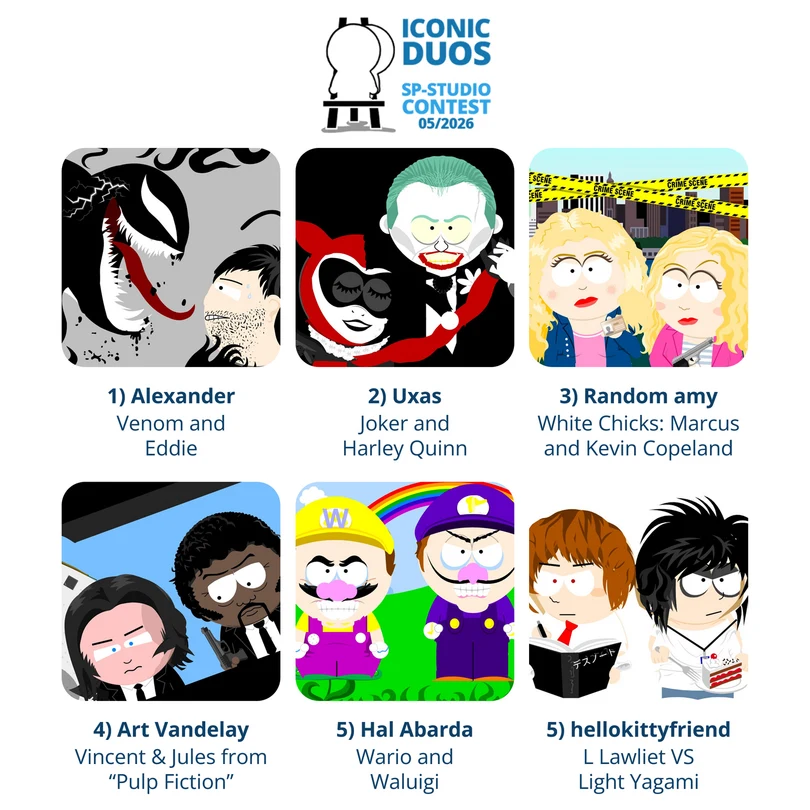
The final results are a combination of the public vote and the jury vote. SEE THE FULL LEADERBOARD HERE.
Thank you all for participating! Check out the contest page on sp-studio.de with the Hall of Fame.
The next contest will start around June 5th.
~~~~~~~~~~~
🎨 Create an SP-Studio.de picture about a famous pair! 🎨
Batman and Robin, Romeo and Juliet, Mario and Luigi, Laurel and Hardy... No matter if they are best friends, deeply in love, siblings or just business partners: This month we focus on iconic duos! Think of famous fictional characters from cartoons, films or books… or of real people, like musicians or celebrity couples. The important thing is that they are well known for appearing together.
📢 R U L E S 📢
- It might be best to show both characters of the duo, but you are also allowed to be creative (for example by only using a speech bubble for one of them).
- Only existing pairs count, no fan fiction (but of course you are allowed to interpret their relationship in different ways… as long as it is in good taste).
- When uploading, always type in a TITLE and your NAME! Use the same name for all your uploads. Do not use names like "anonymous" / "idk" / "me" (too many use them). Switching between different names will lead to disqualification.
- NO HATEFUL PICTURES! Please behave. Racism, hate against queer people or insults in general are not accepted. Avoid topics like real life crimes, ongoing wars or similar political conflicts. Even if you mean no harm a picture without context can hurt others.
- If you upload more than one picture only the newest one counts.
- Of course only sp-studio.de pictures count. Do not edit with extra software. Do not copy other SP-Studio pictures.
🔍 T I P 🔍
How to show 2 characters in one picture:
- Build the first character.
- Make sure you click on every part and press the LOCK button.
- MOVE all parts to a different place. This needs some patience.
- Build a second character. Because of locking the items you can now add a different body from the skin category.
💡 S U G G E S T I O N S 💡
- Plain color white backgrounds can be found in places / abstract backgrounds. If you don't select one you get a transparent background - and they do not work here.
- Don't forget to add hands to your character if they hold objects. It looks strange otherwise. And don't forget to recolor the blue skin.
- To make your picture interesting try moving items in a creative way. You can combine them with the "lock" function.
- Screenshots of your whole phone screen do not count. They are not neccessary, because you can save SP-Studio pictures by clicking on the disc symbol and then "Download as image".
- Have fun! 😊